

Add Product Dimensions
When you add a new product, the optional step– Add Product Dimensions allows you to enter physical details such as height, width, depth, Net Weight, and Gross Weight. Providing product dimensions helps ensure your product data is complete and accurate for downstream business processes, including logistics, shipping, warehousing, and trading partner data exchange. Adding these details can reduce errors, support operational efficiency, and help partners correctly handle, store, and transport your products.
View the video below for step‑by‑step guidance.
As defined in the GS1 Packaging Measurement Rules Standard, measurements are based on whether the items is a:
Product Dimensions:
Please refer to the GS1 Package and Product Measurement Standard for detailed instructions, but here is some general measurement guidance.
First, determine the “Default Front” of the product.
GS1 Standards define the Default Front as “the surface with the largest area that is used by the manufacturer to ‘sell’ the product to the consumer.”
Note: These are items in which “Yes” was selected for Purchasable by Consumer?

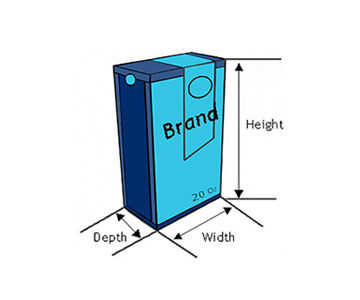
You can then determine the height, width and depth of the item. While facing the Default Front, you must measure:
- Height: from the base to the top
- Width: from the left to the right
- Depth: from the front to the back
Product Weight:
Net Weight - Net is the weight of the product itself. This does not include the product’s container packaging. For example, the weight of the soup you pour out of the can.
Note: Net Weight cannot be changed for a product set to In Use. Also, if Net Weight is entered, the Gross Weight must also be entered. The Net Weight cannot exceed the Gross Weight.
Gross Weight - Gross is the weight of the product plus the weight of its container or packaging. For example, the weight of the jam contents plus the jar itself.
Note: Gross weight can be changed if does not exceed 20% of the original weight for a product set to In Use.
Non-consumer trade items are identified with a GTIN and are intended for General Distribution scanning. This includes outer cases up to the largest form of bulk packaging for trade items.
Note: These are items in which “Yes” was selected for For Shipping Purposes Only?
Product Dimensions:
Please refer to the GS1 Package and Product Measurement Standard for detailed instructions, but below is some general measurement guidance.
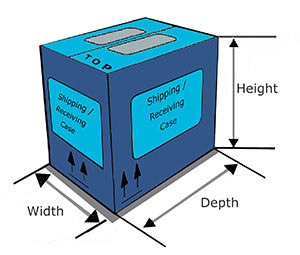
First, determine the “Natural Base” of the item before determining the height, width and depth of the item. The Natural Base is the natural underside of the packaged item pre-shipment (e.g., case). After you determine the Natural Base you can then measure:
- Height: the distance between the Natural Base of the non-consumer trade item and the top
- Width: the shorter side of the natural base of the non-consumer trade item
- Depth/Length: the longer side of the natural base of the non-consumer trade item
Product Weight:
Gross is the weight of the current packaging, which would include the gross weight of items contained in this packaging.